The Image area is where study images are viewed and marked up. The Image area is displayed on diagnostic monitors, when these are available. It includes many tools for modifying image display. Dictation, the Orthopaedic Application, MPR/MIP, DICOM print, CD export, and other features can also be launched from the Image area.
The main elements of the Image area window are as follows. For more information, click the links below.
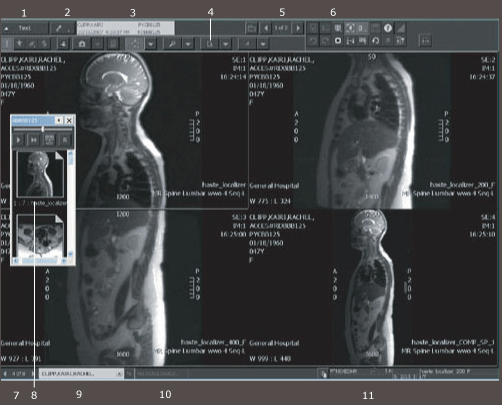
| # | Name | Description |
|---|---|---|
| 1 | Text button | Used to access the Text area in single-monitor configurations (or whenever the Image area appears on the same monitor as the List and Text areas). |
| 2 | Dictate Study button | Available to those with permission to dictate who are using analog, serial, or TalkStation dictation. |
| 3 | Study information panel | Gives study date, time, and accession number and indicates whether the displayed study is also the study whose information appears in the Text area. |
| 4 | Fixed buttons and four button menus | Activates commonly required Image area features. |
| 5 | Study cycle list | Used to navigate through studies for this patient. |
| 6 | Customizable buttons | Activates modality-specific Image area features. |
| 7 | Patient cycle list | Used to navigate through patients. Clicking the 1 of X area opens the Cycle List window. |
| 8 | Available series palette | Used to navigate through series in the study. |
| 9 | Patient information | Lists information about the patient currently displayed. |
| 10 | Set aside patients | The Set Aside button keeps patient's studies open for future access. Clicking the patient tabs displays the set aside studies. |
| 11 | Status bar | Provides image information based on pointer location. For breast images, two magnifications factors are provided: full pixel resolution (P) and true size (T). |
The study images are displayed in columns and rows according to the selected screen format. Right-clicking a study image opens the Context toolbar and context menu.
 | Note: Some of the Image area features are access-controlled through permissions, so not everyone will see all of the described features. |
Required permissions
General: Image Area operation