The screen format setting defines how studies, series, and images are displayed on a monitor—how many of each are displayed at once, and how they are arranged in columns and rows.
IMPAX includes 44 screen format options on multi-monitor configurations, and 38 on single-monitor. A maximum of 10 can appear in the screen format menu. To define which formats are available and which is used by default for each modality, use the Screen Layout tab of the Customize dialog.
To change the current screen format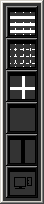
From the Image area top toolbar, click Select Screen Format.

From the Screen Format menu, click the button of the format to apply.