The List area is used to configure and cycle worklists and to search for studies. The List area overlays the Text area.
The List area includes the following components:
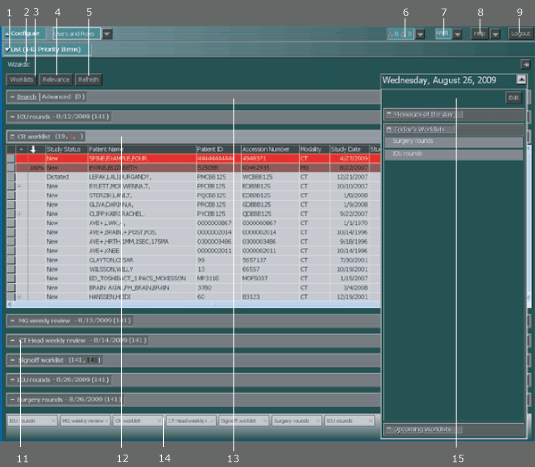
| # | Name | Description | ||
|---|---|---|---|---|
| 1 | List drawer | Shows and hides the List area. Also indicates the number of priority studies in the List area. Note if a study falls in two different priority groupings in two different worklists, it is counted twice in the priority studies number for the List area. |
||
| 2 | Wizards toolbar | Contains the wizard buttons you can click to run any script wizards that have been created or added. | ||
| 3 | Worklists button | Opens the Worklist Library where you can create and manage worklists. | ||
| 4 | Relevance button | Controls whether studies are automatically opened with relevant priors. | ||
| 5 | Refresh button | Manually refreshes the worklists. | ||
| 6 | Job Manager | Used to monitor the status of print, transmit, and retrieve jobs. | ||
| 7 | User ID menu | Used to change your password, select web images for default viewing, select a different license, set an audible notification for incoming studies, configure settings for the station, and define preferences. |
||
| 8 | Help button and menu | Provides access to the online IMPAX 6.5.1 Client Knowledge Base: Extended, sending log files to the server, and IMPAX Client information. | ||
| 9 | Logout button | Logs out of the Client. | ||
| 11 | Worklists | Manage the typical workflow of studies used for interpretation, review during rounds, sign off, and so on. The worklist title bar displays the total number of studies in the worklist, along with the number of studies in each priority grouping rule. To help differentiate which number belongs to which priority grouping number, the numbers are color coordinated to the priority rule background color. For example, the CT worklist bar has the following numbers: 19, 1, 1.
|
||
| 12 | Expanded worklist | Shows studies (grouped by patient by default). | ||
| 13 | Search or Advanced Search bar | Used to find studies and patients. | ||
| 14 | Worklist taskbar | Displays icons of all worklists added to the List area. Worklists can be minimized to the taskbar and rearranged in the List area.
| ||
| 15 | At-a-Glance area | Displays messages, news items, and current and upcoming scheduled worklists. |
 | Note: Some of the List area features are access-controlled through licensing or permissions, so not everyone will see all of the described features. |