The Worklist Library is opened from the List area by clicking the Worklists button. In the Worklist Library, you can:
Create and edit worklists
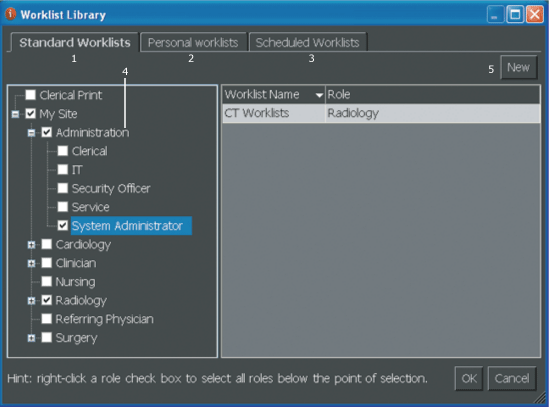
The following elements are part of the Worklist Library:
| # | Name | Description |
|---|---|---|
| 1 | Standard worklists tab | Worklists that are automatically populated with studies based on defined search criteria. |
| 2 | Personal worklists tab | Worklists that are assigned to a user or role that are either automatically populated with studies based on defined search criteria or have studies manually added to it. |
| 3 | Scheduled worklists tab | Worklists defined by date that can include studies based on search criteria or manually added studies. |
| 4 | View panel | Provides a view of the user and role hierarchy (requires the Edit Viewable Worklists permission). |
| 5 | New buttons | Appear on each worklist tab and are used to create new standard worklists, scheduled worklists, personal worklists, or sign-off worklists. |
 | Note: Some of the Worklist Library features are access-controlled through permissions, so not everyone will see all of the described features. |