The Knowledge Base contains full documentation on how to use the product. It opens in a standard browser window and includes various features to help you find the information you need.
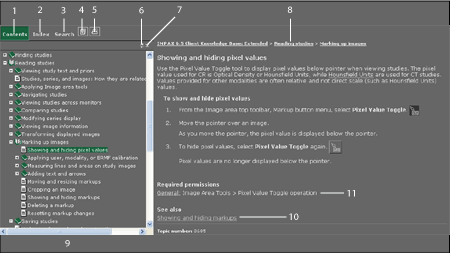
| 1 | Table of Contents | 7 | Close the navigation pane |
| 2 | Index keywords | 8 | Parent trail |
| 3 | Full-text Search | 9 | Navigation pane (showing Contents) |
| 4 | Bookmark page  |
10 | Related topics list |
| 5 | Print topic  |
11 | Required permissions (IMPAX only) |
| 6 | Synchronize table of contents with current topic |