IMPAX 6.5.1 Client Knowledge Base: Extended > Using this Knowledge Base

Showing and hiding the Knowledge Base navigation pane

The Knowledge Base navigation pane appears on the left, showing Contents, Index, or Search options. To have more space for the topic information without enlarging the browser window, you can close the navigation pane.

To hide the Knowledge Base navigation pane

  1. In the navigation pane, click Close navigation pane. Close navigation pane

The navigation pane is hidden, but continues to display the Contents, Index, and Search buttons.
To show the Knowledge Base navigation pane

  1. In the top frame of the Knowledge Base, click Contents, Index, or Search.

The navigation pane redisplays, showing the component you clicked: Contents, Index, or Search.


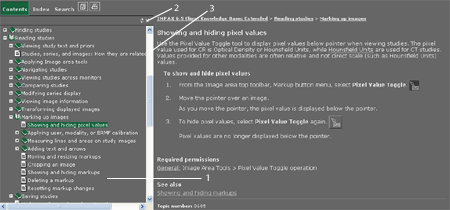
Knowledge Base page with Hide navigation pane button

1 - Navigation pane

2 - Close navigation pane button

3 - Divider bar


See also


Topic number: 8819

Applies to: IMPAX 6.5.1 Client Knowledge Base