IMPAX 6.5.1 Client Knowledge Base: Extended > Using this Knowledge Base

Navigating the Knowledge Base table of contents

The Knowledge Base includes a table of contents that provides hierarchical links to all topics. It includes book links + closed book icon and page links Page icon.

To find topics by using Contents

  1. In the navigation pane on the left, click Contents.

  2. In the Contents pane, click the book or page link of interest.

    The linked topic is displayed in the main window. If you clicked a book link, the icon changes to - open book icon, and related page links appear below.

  3. Repeat step 2 until you reach the topic you need.

After selecting topics through the Index, Search, or related topic links, you can synchronize the Contents pane with the current page to see where it resides in the Contents hierarchy.

To synchronize the Contents pane with the current topic

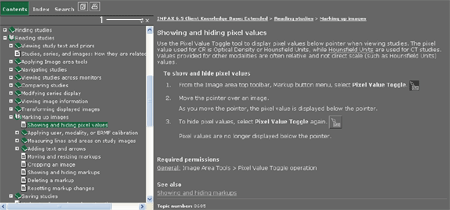
  1. In the Contents pane, click Synchronize table of contents. Sync TOC

    The topic displayed in the main pane is highlighted in the Contents navigation pane.


    Knowledge Base page with Synchronize the Contents button


See also


Topic number: 8814

Applies to: IMPAX 6.5.1 Client Knowledge Base