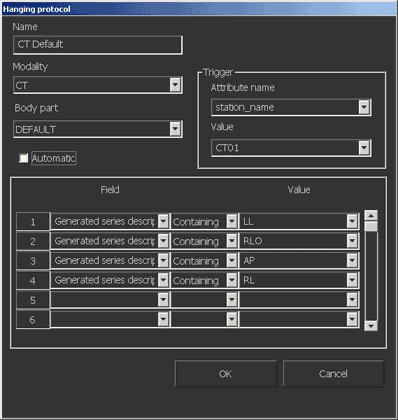
When configuring hanging protocols—whether adding one, copying one, or editing one—you must enter information about it in the Hanging Protocol dialog.
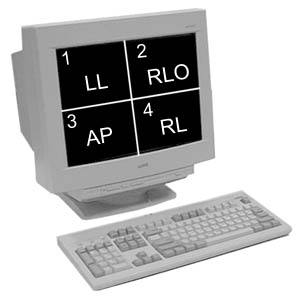
A series that satisfies a hanging protocol rule is moved ahead of a series that does not satisfy that rule. (When multiple series satisfy a given rule, modality ordering is used for them.) While the hanging protocol determines the order of the series in a study, the number of series placed on a screen at any given time is determined by the current screen format and series view mode.
 | Note: In a combined series, hanging protocols only apply to CR, DR, and DX studies. |
To define a hanging protocol
If setting preferences for other users, impersonate the user or role.
Hanging protocols created at the role level can be edited or removed only when impersonating that role. They are visible to but not editable by any lower-level users or roles. They are not visible to any higher-level roles. Hanging protocols created at the user level can be viewed, edited, or removed only by the user who created them; they are not visible to higher-level roles.
Press F12 or, from the Image area top toolbar, click Customize.

In the Customize dialog, switch to the Hanging Protocol tab.
To add a hanging protocol, click New.
or
To edit an existing or copied hanging protocol, select it in the list and click Edit.
In the Hanging Protocol dialog, type a descriptive Name for the hanging protocol.
If the protocol was copied, change its name to distinguish it from the original.
Note:
If a name is not specified, a name is auto-generated based on modality and body part.
Select the Modality and Body Part (if available) to configure the protocol for.
If required, set or change the Trigger. A trigger is an extra filter that is checked when determining whether the hanging protocol should be applied. To set or change a trigger:
In the Attribute Name field, type or select the DICOM attribute to be checked.
In the Value field, type or select what the DICOM attribute value should be before the hanging protocol is applied.
Note:
We recommend using the series_description attribute instead of the Generated Series Description attribute for all modalities. The Generated Series Description attribute is only applicable for MR and XA modalities. If selected for any other modalities, an empty string is returned.
To force this protocol to be applied automatically, select the Automatic checkbox.
If selected, the protocol is automatically applied when a study matching the specified criteria is displayed. If cleared, the protocol is applied by using the Set Series Hanging Protocol tool.
In each numbered slot, type or select the Field, comparison method, and Value in the order that rules are to be applied.
List
Description
Options
Field
The DICOM attribute this rule applies to.
If you do not type or select a Field option, the following attributes are used:
For CR, DR, and DX studies: hanging_protocol
For MR studies: series_description or generated series description (depending on the MR: Use generated series description checkbox in the Customize dialog - User Profile tab)
For CT studies: the generated series description
Comparison method list
The type of check the rule should do.
Containing = the rule applies if the field contains the selected value anywhere
Not Containing = the rule applies if the field does not contain the selected value
Exact Match = the rule applies if the field contains exactly and only the selected value
Ends with = the rule applies if the field ends with the selected value
Starts with = the rules applies if the field begins with the selected value
Value
The value of the DICOM attribute that the rule is checking on. Some of these options are defined in the Series Description dialog.
Type or select a value. Options available for selection vary with the modality. Examples are AP for CR studies and T1 SAGITTAL for MR studies.
When all rules are defined, to return to the Hanging Protocol tab of the Customize dialog, click OK.