The printable area is the width and height of the area on the film sheet that can actually be printed to: the film sheet size minus the non-printable borders. Defining the printable area is required for using the Composite Layout print feature. It is also used for correctly positioning annotations on prints.
| 8.5" sheet size | |
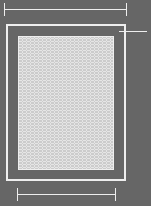 |
Non-printing border |
| Printable area = 8.5" sheet - non-printing border | |
To define the printable area
Add a printer or select a printer to copy, enter information in the first two screens and click Next until you reach the Printable Area screen.
or
Select a printer to edit and switch to the Printable Area tab.
To determine what dimensions to use, refer to the printer manufacturer's documentation. Also refer to Standard paper sizes.
or
If editing or copying printer configuration, in the Printable Area list, select the Film Size to use for composite layout printing. Click Print Test Page. (When configuring a new printer, this option is not available.) On the landscape and portrait test sheets, measure the length of the printed vertical and horizontal lines.
Type or modify the Portrait and Landscape Width and Height values according to the information determined in step 2.
To not define the printable area, leave all values at 0.
When finished, click Next or OK.