An annotation is text or graphics that is not part of the diagnostic image sent by the modality but is printed on the film with the image. The space reserved for annotations on the film are called annotation boxes. IMPAX supports the inclusion of logos in these annotation boxes.
| Upper annotation boxes | |
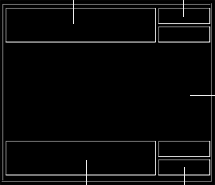 |
Printable area |
| Lower annotation boxes |
The logo files used may be provided by the printer vendor or may be specific to the site. They must be TIFF files and must reside on the printer hard disk. IMPAX does not verify the location or existence of these files.
When adding a printer or copying properties to a new printer, you can add or remove logo files. When editing a printer's configuration, you can change which logo files are selected.
To select a logo file for a printer
Add a printer or select a printer to copy, enter information in the first six screens and click Next until you reach the Logo screen.
or
Select a printer to edit and switch to the Logo tab.
To add a logo file, click Add and type its fully qualified file name under File Path.
The directory path provided must be relative to the printer, not to the Client computer or Application Server. The Logo File field has a limit of 64 characters. If that is not enough, rename or move the file until the path fits.
To remove a logo file, select it in the Logo Files list and click Delete.
Click Next or OK.