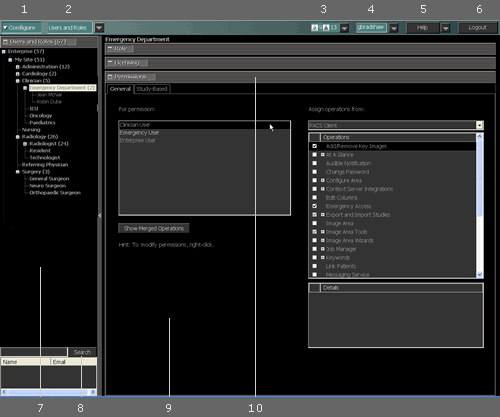
PACS Administrators use the Configure area to set up roles and users, define printers, configure stations, and set certain preferences. Changes in the Configure area are automatically saved.
The main elements of the Configure area window are as follows:
# |
Name |
Description |
|---|---|---|
1 |
Shows and hides the Configure area. |
|
2 |
Switches among the different sections of the Configure area: Users and Roles, Preferences, Stations, and Printers. |
|
3 |
Used to monitor and refresh the status of print, transmit, and retrieve jobs. |
|
4 |
User ID and menu |
Used to change your password, switch between original and wavelet images for default viewing, select a different license, set an audible notification for incoming studies, configure settings for the station, and define preferences. |
5 |
Provides access to the online IMPAX Client Knowledge Base, sending log files to the server, and about IMPAX Client information. |
|
6 |
Logout button |
Logs out of the Client. Logout changes to Done when impersonating users or roles. When authenticating with a smart card, impersonation is not available. |
7 |
Navigation pane |
Used to navigate the role and user hierarchy in the Users and Roles and Preferences sections, the list of stations in the Stations section, and the list of printers in the Printers section. |
8 |
Search panel |
Searches for users in the role hierarchy. |
9 |
Details pane |
Defines all of the configuration options related to the item selected in the navigation pane. |
10 |
Navigation bars |
Used to move among the different configuration options, such as Licensing and Permissions. |
Required permissions
General: Configure area > Preferences operation
General: Configure area > Printers operation
General: Configure area > Stations operation
General: Configure area > Users and Roles operation