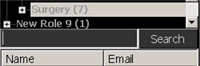
In the Configure area, you can search for a user by name, email address, role, or phone number. The search results show matches on any field. For example, if the role “ICU Team” is the search text, all users in the ICU Team role are returned.
To search for users
From the Configure drawer menu
 , select Users and Roles.
or
From the Configure drawer menu
, select Preferences.In the navigator Search box, type a name, email address, role, or telephone number.
Click Search.
The results appear in a table below the Search box.
To highlight the user in the navigation pane, double-click one of the results.
Navigator Search box appears below the scrolling role and user hierarchy