Three main IMPAX screen layout options work together to define how images, series, and studies are arranged on the available Image area monitors: screen format, study view mode, and series view mode.
Number of monitors
One, two, or four—but not three—Image area monitors are supported.
The screen format setting defines how images, series, and studies are arranged in columns and rows on each monitor. A few of the screen format options allow you to apply different screen formats to different monitors, but most apply the same format to all monitors.
Study view mode defines which studies are displayed on which monitors for the given screen format. It has no effect on single-monitor systems. On two-monitor systems, you can choose to view the same or different studies on each monitor. On four-monitor systems, you can view the same studies on all monitors, different studies on all monitors, or the same studies on the first two monitors and different studies on the next two.
Series view mode can be used only when the same studies are being viewed on two or more monitors. It defines whether each instance of the study displays the same or different series.
 | Tip: Preset screen layouts are available for certain time-based studies. Preset screen layouts apply the appropriate combination of screen layout options based on the number of available monitors and the number of studies, series, and images to be displayed. |
Examples
The following diagrams show the effect of using various screen formats, study view modes, and series view modes together. The tooltip text for Screen format is in this format: Element: Rows x Columns, where Element is Study, Series, or Image.
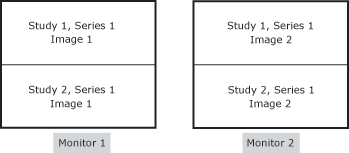 |
Number of monitors: 2 Study view mode: Span two monitors Series view mode: Same series Screen format: Study:2x1, Series:1x1, Image:1x1 |
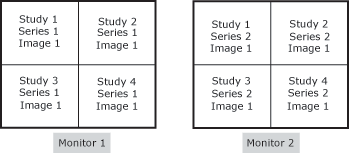 |
Number of monitors: 2 Study view mode: Span two monitors Series view mode: Different series Screen format: Study:2x2, Series:1x1, Image:1x1 |
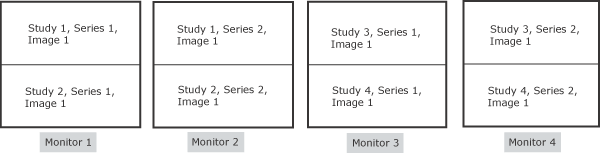
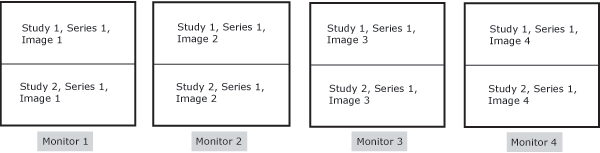
Screen format: Study:2x1, Series:1x1, Image:1x1
 | Note: The order in which the series appear is defined by hanging protocols, if applied. Otherwise, the order is based on the order submitted by the modality or any saved changes to the modality series order. |