IMPAX can be configured to store two versions of every image: the JPEG (or original) image and a wavelet version that uses wavelet encoding to support faster loading and smaller file size. Given that the difference in quality between JPEG and wavelet images is often unnoticeable, many IMPAX users are given access only to wavelet images. Radiologists, however, are typically given the choice of viewing JPEG (original) or wavelet versions.
If your system is set to load the best quality images available, you can switch to the wavelet versions as needed—for example, if working on a slower network. Wavelet images are available only in clusters that include an IMPAX Curator.
When wavelet image display is enabled, IMPAX first looks for lossless wavelet compression versions of the study. If none are found, IMPAX creates a wavelet version on demand.
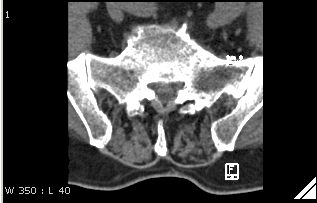
 | Note: If an image features lossy compression, a triangle appears in the lower right corner of the image (see image below). Wavelet images, unlike JPEG images, load progressively, meaning that some data is retrieved and displayed immediately and more is added as it becomes availability. A lossy image, which loads faster, may be replaced by a lossless image, if available, when it fully loads. Therefore, the triangle symbol may appear for the lossy image but disappear when loading is complete for the lossless image. |
To view wavelet images
On the List or Configure area drawer, click the User ID menu.

Ensure Show Web Images is selected.
If this command does not appear, the system is set to view the best quality images available. If the command appears but is not checked, the system displays lossless images, if present in IMPAX.
Note:
IMPAX only indicates an image if it is lossy compressed (the triangle); therefore, lossless images are presented with no indication.
For images you now open
or cycle into the Image area, IMPAX first looks in the web cached. If not available, IMPAX then looks for a JPEG and creates a wavelet from the JPEG. (If the images must be converted to wavelet images
before being displayed, the  symbol appears in the first column of the worklists,
search results, or Study List. When you open or cycle the studies, the conversion
happens automatically. It may take some time.)
symbol appears in the first column of the worklists,
search results, or Study List. When you open or cycle the studies, the conversion
happens automatically. It may take some time.)
Lossy indicator in lower right corner