By default, Auto Cycle cycles the entire worklist to work through a list of studies more quickly. You can cycle multiple worklists at once. For example, if you are covering neuroradiology and all emergency studies for the afternoon, you can cycle the MR Head, CT Head, and ER worklists; however, you may want to only automatically cycle the STAT! studies or other priority grouped items.
To cycle all or groups of studies in a worklist
To specify the groups of studies (by priority group), right-click Cycle.

To deselect the priority groups you do not want cycled, clear the checkbox next to the priority group.
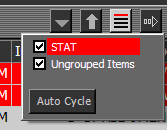
In a worklist bar, click Auto Cycle.
The related studies in the worklist are cycled, with relevant priors if configured to do so. The Auto Cycle button remains pressed. The studies are added in the order they appear in the worklist. If multiple worklists are cycled, then the studies are added from each worklist in the order in which the worklists are cycled. However, the studies are re-arranged by the priority grouping rules and ordering of the Cycle List.

Note:
Relevant priors are not loaded when a study is opened from a scheduled worklist, even if relevancy rules are enabled.
Any studies that arrive in the worklist are automatically added to the Image area cycle list.
| Note: If configured, the cycled studies are ordered with the oldest undictated study appearing first for a patient in the Image area. |
Required permissions
General: Cycle Studies operation
General: Image Area operation
General: Modality > View All or specific modality operation
General: Text Area > Enable Text Area operation
Study-based: View Study operation