1. Pre-acquisition > 2. Image acquisition > 3. Routing > 4. Reporting > 5. Long-term storage
The acquisition phase begins when the patient arrives at the hospital for the study, including when the technologist acquires the study images, and ends when the patient ID and accession number are verified.
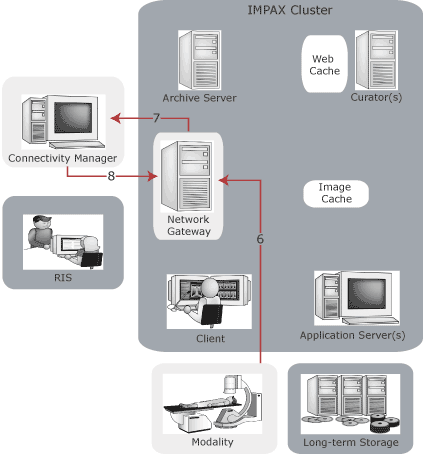
6. Just prior to the exam, the study information is entered at the modality console. After the exam, the Network Gateway receives the images for the study.
 | CAUTION! The technologist must make every effort to select the correct patient from the Modality Worklist. If the wrong patient is selected at the modality, no automatic method detects this. |
Patient ID and Accession number are the minimum amount of information that must be entered. Modalities that support DICOM Modality Worklists can retrieve this information directly from the Connectivity Manager.
7. The Network Gateway uses the Patient ID and the Accession number to query the Connectivity Manager. If the Accession number is not supported by the modality, the Network Gateway uses the study date and possibly the modality to query the Connectivity Manager.
8. The Connectivity Manager verifies that the Patient ID and Accession number are valid. It returns additional information supplied in the study order by the RIS to fully populate the DICOM image objects.
1. Pre-acquisition > 2. Image acquisition > 3. Routing > 4. Reporting > 5. Long-term storage