1. Pre-acquisition > 2. Image acquisition > 3. Routing > 4. Reporting > 5. Long-term storage
The reporting phase occurs when the radiologist views the study images and the study status is upgraded to report approved.
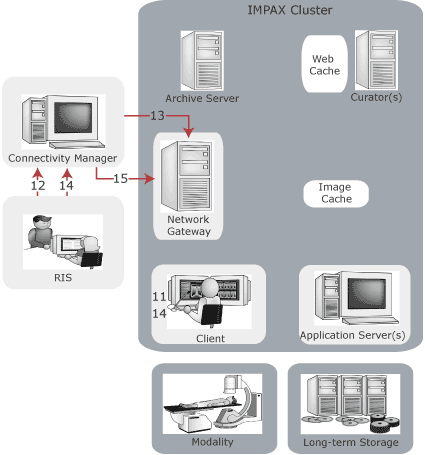
11. At the Client, the radiologist selects the studies that are not dictated and any prefetched prior studies. At the end of each dictation, the radiologist clicks the Dictated button and the study is removed from the worklist.
12. The report is transcribed and entered into the RIS. The RIS transmits the preliminary report to the Connectivity Manager to store in its database.
13. The Connectivity Manager notifies the Network Gateway that it has received the report. The Network Gateway upgrades the study from dictated to preliminary report status.
14. The radiologist views the preliminary report at the Client. The final report is approved and stored on the RIS.
15. The Connectivity Manager notifies the Network Gateway it has received the final report. The Network Gateway upgrades the study status to indicate the report was approved.
1. Pre-acquisition > 2. Image acquisition > 3. Routing > 4. Reporting > 5. Long-term storage