Comparative Review Modes automate the application of screen formats, study view modes, and hanging protocols to the craniocaudal (CC), mediolateral oblique (MLO), latero-medial (LM), medio-lateral (ML), and cranio-caudal exaggerated laterally (XCCL) images from current and prior studies. Current and prior studies are identified by their timestamps. The most recent study is identified by having the most current acquisition time. All older studies are considered as prior studies.
IMPAX automatically displays mammography studies in the configured Comparative Review Mode:
If the modality type equals MG
If a sequence of Comparative Review Modes is defined
If the body part equals BREAST
If the standard view equals CC, MLO, LM, ML, or XCCL
One standard view must be present for a Current Only or Prior Only view to be enabled. One current and one prior standard view must be present for a Current/Prior Compare view to be enabled. If the standard view is not present, the format icon is not highlighted and cannot be used.
You can step through the sequence of comparative
review modes or select a specific mode from
the sequence. Each mode is represented by a button such as  . The table below
explains how to interpret the buttons.
. The table below
explains how to interpret the buttons.
| Element of Comparative Review Mode | Meaning | Options |
|---|---|---|
Craniocaudal image  |
Mammography View |
L = left craniocaudal R = right craniocaudal |
Mediolateral oblique image  |
Mammography View | L = left mediolateral oblique R = right mediolateral oblique |
| Image line color | Current or prior study |
|
| Left and right rectangles |
The monitor the Mammography View is displayed on | Left rectangle = first monitor Right rectangle = second monitor |
Tooltip |
Name of the Comparative Review Mode Mammography View |
Each Mammography View has a different tooltip. Abbreviation key: L = left R = right CC = craniocaudal MLO = mediolateral oblique LM = latero-medial ML = medio lateral XCCL = cranio-caudal exaggerated laterally |
 dark gray = prior
Comparative Review Mode options
Example
The following examples show the effect of using various Comparative Review Modes when the Image area is displayed on two monitors.
| Mode selected | Display | Applied formatting |
|---|---|---|
 Compare CC Compare CCRight on Left |
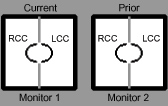 |
Study view mode: Span two monitors Screen format |
 Compare CC Compare CCLeft on Left | 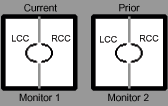 | Study view mode: Span two monitors Screen format: Study:1x1, Series:1x2, Image:1x1 |
| Compare MLO |
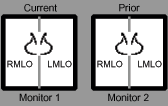 |
Study view mode: Span two monitors Screen format: Study:1x1, Series:1x2, Image:1x1 |
 Compare MLO/CC Compare MLO/CC |
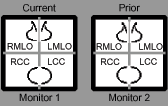 |
Study view mode: Span two monitors Screen format: Study:1x1, Series:2x2, Image:1x1 |

 :
:The orientation of the Mammography View selected for display is determined by the Left and Right Breast Comparison and Same View settings in the Comparative Review tab of the Customize dialog. This setting determines if the right breast or the left breast is presented on the left sides of the displays and whether or not compare views are chest wall aligned or presented with the nipples pointing in the same direction.