The Scout tool shows the position of images that were captured in CT and MR studies. Scout displays an image orthogonal to the images in the currently selected series. It shows lines indicating the intersections of the images in the series with the orthogonal image. The Scout tool is enabled only when a series contains a scout image.
To navigate by scout slice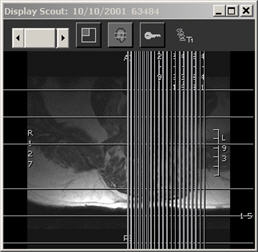
View a scout image for a CT or MR series.
In the Display Scout window, click Multiline Scout.

All the image intersections are shown, with the current intersection highlighted. The end of each intersection line has a navigation square.
Click an image intersection line to navigate to that slice location.
A highlight box appears around the image that corresponds to the slice location.
 | Tip: To
leave the Scout window open, but move it out of the way, click Dock
Scout Window. |
