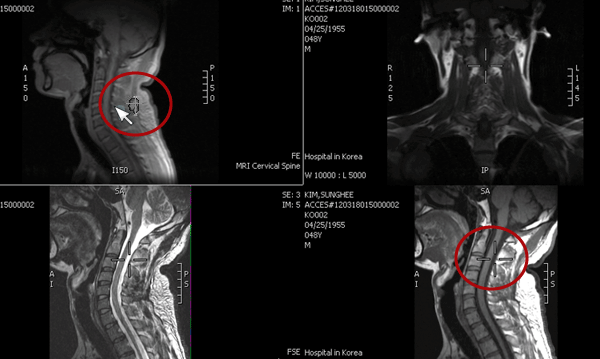
Active Target mode helps the radiologist to determine a matching location of a single point in other series in view.
Active Target mode always uses table position to determine if an image contains a matching location. If you have manually adjusted linking for patient movement, this is ignored while in Active Target mode. When in Active Target mode, linking is disabled (but not forgotten) and is only restored when you exit the mode.
 | Note: Reference lines for only the active series show when in Active Target mode but disappear when you click to display the active target. Any options set in the Linking Preferences context menu also take affect. For example, if you disabled Show Reference Lines in the Link Preferences menu, the reference lines for the active series do not show. |
To orient in 3D using Active Target mode 
Select a screen format that displays more than one series at once.
Left-click Active Target.

The Active Target cursor is highlighted in the upper, left-hand image of the example.
To activate the target in the other series, hold down the left mouse button on the area of interest.
You can click on any series when in Active Target mode. A cross hair (highlighted in the bottom, right-hand image of the example) is displayed on the other images in view indicating the point in each image that matches the point under the mouse cursor.
If a series is not displaying an image with a matching point, IMPAX automatically navigates the series to the matching image if one exists. If no matching point is found in a particular series, the series is dimmed and the message "No matching location" is displayed on the series. If a series is of a different frame of reference, the series is dimmed and the message "3D information does not match active series" is displayed on the series.
To navigate in the series around the point of interest, use the mouse wheel or the Page Up and Page Down keys
Note:
Active Target mode is disabled when changing screen formats, navigating studies, linking series from different studies, or the left-mouse button is released.
To view reference lines of the active series, release the left mouse button.
To turn off Active Target, left-click the Active Target button again.