The Available Series palette is used to navigate through series. You can configure IMPAX to open this palette automatically on studies that have more series than can currently be displayed.
 | Tip: The number of series displayed at once depends on the screen format and series view mode. |
To show the Available Series palette by default
If setting preferences for other users, impersonate the user or role.
Press F12 or, from the Image area top toolbar, click Customize.

In the Customize dialog, switch to the User Profile tab.
Under Startup Defaults, select the Show Available Series checkbox.
To save the changes and close the Customize dialog, click OK.
The Available Series palette will appear the next time applicable studies are opened or cycled in the Image area.
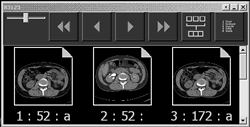
 | Note: The white triangle in the upper right corner of the image indicates that the series has been previously displayed at some time in the Image area. If there is no triangle, the series has never been viewed. |