IMPAX 6.5.1 Client Knowledge Base: Extended > Reading studies > Applying Image area tools

Setting the scope of tool applications

Scope refers to whether a tool action is applied to a single image, to all images in a series, or to all images in a study. Before you apply a tool, set the scope of the change. Otherwise, you may inadvertently change an entire series when you wanted to change only a single image, for example.

Tip

Tip:

To set the default scope for the window level, magnify, and cine tools, use the Screen Layout tab of the Customize dialog. For other tools, the default scope is image.

To change scope for a tool selected from the top toolbar (or a pinned context toolbar), select the Scope command from the top toolbar.

To set tool scope from the top toolbar

  1. If the Scope tool button does not appear on the top toolbar, use the Customize dialog Toolbar tab to add it.

  2. From the top toolbar, activate an Image area tool that can be applied to images, series, or studies.

    Scope has no effect on certain tools, such as Magnify Glass.

  3. From the top toolbar, click Scope until it is set to the appropriate state:

    Button image Applies tool to
    Image scope Image
    Series scope Series
    Study scope Study

    The pointer shape also indicates the selected scope.

  4. Use the tool.

    Changes made with the tool apply to the image, series, or study, based on the state of the Scope button.
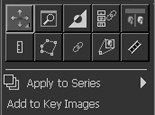
To apply scope to a tool selected from an unpinned context toolbar in button mode, use the Image area context menu to set scope.

To set tool scope by using the context menu

  1. From the context toolbar, click the Image area tool to use.

    Do not move the pointer off the toolbar. Notice that the Apply to command indicates the current scope: It will be Apply to Image, Apply to Series, or Apply to Study.


    Scope tools in context toolbar

  2. To change the current scope, place the pointer on the Apply to menu, then click Image, Series, or Study.

    Your selection is reflected in the context menu and the pointer shape.

  3. Move the pointer off the context toolbar and use the tool.

    Changes made with the tool apply to the image, series, or study, based on the selected scope command.

Note:

Note:

Scope can be set differently on different Image area monitors.


See also - Administration


See also - Clinical


Topic number: 8391

Applies to: IMPAX 6.5.1 Client Knowledge Base