The Image Viewer is intended for reference viewing only and is not recommended for diagnostic use; if a more detailed image analysis is required, Agfa recommends that the images be exported to a full PACS device. The medical images contained on the CD or DVD are of the highest resolution and quality available at the time of creation and are not compressed or altered in any way that would detract from their clinical quality.
The Image Viewer is a small application used to view images burned to CD or DVD without running IMPAX. This application gets burned onto the CD or DVD with the study images when the Include image viewer on each disk checkbox is selected. It can be run under various releases of Windows, but is not supported on Macintosh computers.
Compared with the IMPAX Image area, the Image Viewer differs in the following ways:
A scout is displayed in a second window.
Only one study is displayed at a time.
From one to four series can be displayed at once.
From one to eight images can be displayed at once.
Tools appear in top and side toolbars, and tool buttons are different.
The functionality of some tools is slightly different.
No Text area is available, so study and report information is accessible through tools.
You cannot save image changes.
Key image notes images cannot be viewed from the Image Viewer.
Structured reports cannot be viewed from the Image Viewer.
You cannot view softcopy presentation states using the image viewer, although they are exported to the disc. If the studies are imported to IMPAX from the disc, the softcopy presentation states can be viewed.
Available demographic information includes patient name, study date and time, performing institution, patient ID, accession number, and study description.
The About dialog is displayed when the Image Viewer is launched. It displays site information either added when the CD/DVD was burned locally, or added automatically when the CD/DVD was burned remotely.
To view studies with the Image Viewer
Insert a CD or DVD that includes the Image Viewer.
The Image Viewer launches automatically.
If a warning about screen resolution values appears, click Yes to continue or No to exit.
If you select No, you can change the screen resolution, then repeat step 1.
Close the About dialog.
View the studies and apply the tools as required.
The image viewer window appears as follows:
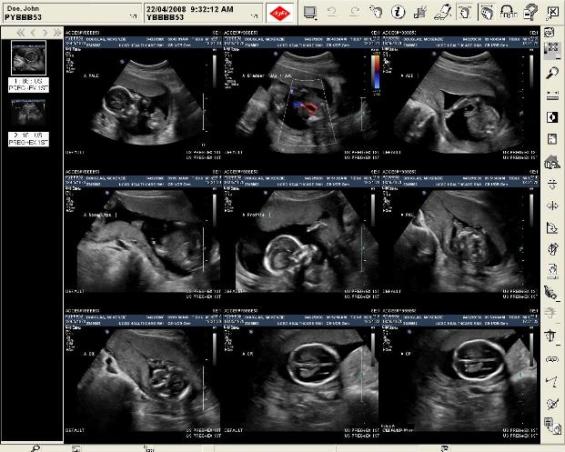
The following tools are available:
| Advance by page/image/tab | Global scope | Rotate Right |
| Cine viewer | Help | Select screen format |
| Collimate | Invert | Smooth rotation |
| Cursor mode | Link Series | Study Information |
| Demographics toggle | Markup angle | Undo |
| Display markup toggle | Markup caliper | User Image Calibration |
| Display scout | Markup Region of interest | View DICOM Structured Report |
| Exit | Nuclear Medicine Palette | Window level |
| Export Images as JPEG | Redo | Zoom |
| Flip horizontal | Reset images | |
| Flip vertical | Retrieve Report |
The Available Series palette is also available.