From the Image area, you can choose specific images from a study, and open them individually in the Orthopaedic Application. In the Orthopaedic Pre-Surgical Planning window, you can:
Apply digital templates and perform steps for relevant measurements, angles, and so on
Complete post-surgical comparisons and tracking activities
The main elements of the Orthopaedic Pre-Surgical Planning window are as follows:
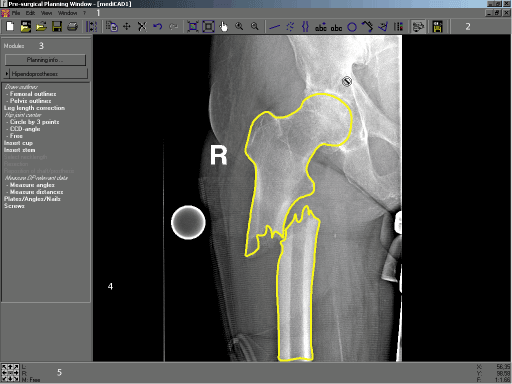
| # | Name | Description |
|---|---|---|
| 1 | Menu bar | Used to activate various general functions, for example the Orthopaedic Application settings. |
| 2 | Horizontal toolbar | Contains the tools used for the Orthopaedic application. |
| 3 | Module and function tool area | Guides users through the work routines step-by-step. |
| 4 | Image display area | Displays the loaded images where users can edit them. The Image display area can be divided into several windows. |
| 5 | Image information area | Provides information on the function tool to guide users step-by-step through all procedures, coordinates of the mouse point, and buttons for moving the displayed image segment. |
For details on using the tools and menus in the Pre-Surgical Planning window, refer to the Orthopaedic Application User's Guide (PDF).
 | Note: You can review the images for only one patient at a time in the Orthopaedic Application. If you switch to another patient in the Image area while the Orthopaedic Application is open, you are asked to save your current work and close the window. |
Required permissions
General: Orthopaedic Application operation