In the IMPAX Client, you can configure station containers to access different image caches, as described in “Prioritizing the image cache accessed by the IMPAX Client” (topic number 47471) in the IMPAX 6.5.1 Client Knowledge Base: Extended.
To complete the configuration, you must set the priorities of each stations container defined as a virtual AE title, so that the appropriate one is accessed when IMPAX Clients request images. You do this in the Image Access Manager.
To modify the priorities of station containers configured to optimize cache retrieval speed
On the Setup tab, click Image Access Manager.

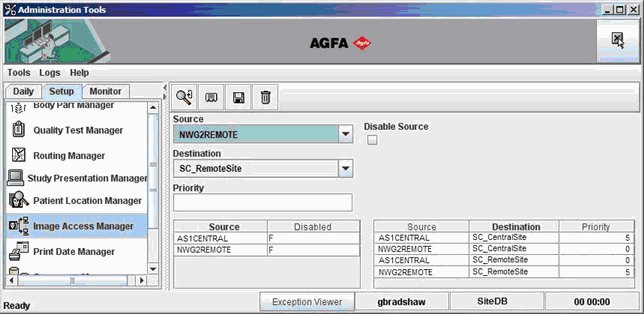
From the Source / Disabled list, select the name of the station that contains the image cache to configure, and ensure that the Disable Source checkbox is cleared.
You may want to start by configuring the local stations, then configuring the remote stations.
From the Source / Destination / Priority table, select one of the station containers (virtual AE titles) that was created for cache prioritization.
In the Priority field, type the appropriate priority value.
The greater the value, the higher the priority. Assign greater values to image caches located in the same cluster as the selected station container.
Click Save.

Repeat steps 2 to 5 for all other station containers defined for cache prioritization.
In the Source / Destination / Priority table, click the Destination column heading to sort the data by destination.
Verify that the priorities are set correctly.
If any priorities need to be changed, perform the following steps.
In the Source / Disabled table, select the source to modify.
In the Source / Destination / Priority table, select the destination whose source priorities need to change.
Type the new Priority value.
Click Save.
The example that follows features a local site, served by Network Gateway AS1CENTRAL, configured to access the image cache group SC_CentralSite first, while the remote site, served by Network Gateway NWG2REMOTE, accesses the SC_RemoteSite image cache group first.
Also be sure to configure routing to optimize system performance.
Required permissions
Administration Tools: Image Access Manager > View operation