Through the Configure area - Stations section, you can define various options for the stations that connect to IMPAX. In the navigation pane of the Stations section, all stations are organized in station containers, which are in turn organized in containers. How stations are organized affect configuration decisions.
 | Note: Stations can exist only in station containers and station containers can exist only in containers—you cannot add stations to containers, or containers to station containers. |
Stations
A station is any computer that has the IMPAX Client installed. Stations can be in a radiology reading room, in the offices of clinicians, in emergency departments, or in the homes of radiologists, for example.
When a user logs into IMPAX for the first time, the computer name is listed in the navigation pane of the Stations section. By default, the computer name is listed in the Internet station container, although you can change the default station container on the Application Server. (Also, you can always move the station to a different station container later.)
A station can appear only once in the navigation pane.
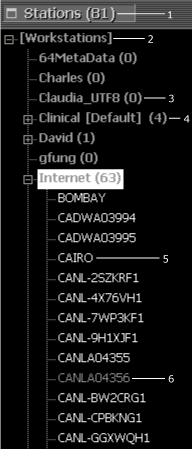
| # | Description |
| 1 | Total number of stations |
| 2 | Container |
| 3 | Station Container |
| 4 | Default Station Container |
| 5 | Station with custom configuration |
| 6 | Station with inherited configuration |
Station containers
Stations are organized under station containers. Station containers are like folders that organize groups of stations. Each station container lists the total number of stations underneath it. You can configure options for a station container, which are then inherited by all stations in that station container.
A station can inherit all of its configuration options from its station container. Or, you can choose to change the configuration of a specific station within a station container. For example, one older station in the radiology reading room could use a different type of monitor calibration than the rest of the stations. You can set the standard calibration type for all the stations at the station container level. Then, in the navigation pane, you can select the one older station and define just the calibration type for its diagnostic monitors.
Once you make configuration changes for a specific station, changes made to its parent station container are not inherited. (The exception is configuration settings that are only available at the station container level, such as Services Access.) You can, however, revert to the inherited configuration at any time.
Stations that inherit all of their settings from their station containers are gray in the navigation pane. Stations that have a custom setting are white.
Containers
In the navigation pane of the Stations section, containers hold station containers. Much like a file folder, containers organize station containers into logical groupings. The container itself cannot be configured. Note that containers are surrounded by [square brackets].