To find out how many studies are available in the IMPAX system for the current patient, use the Study List in the Text area. More studies will be available when using the IMPAX RIS.
To check the total current and prior studies for a patient
Display the Text area for the patient of interest.
If the Study List is hidden in the Text area, click the expandable bar's arrow.

If the Study List is contracted, click the Study List bar to expand it.
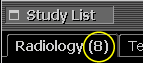
The number of current and prior studies is displayed on the Radiology tab.

Tip:
We recommend selecting both the Study Date and Study Time columns to ensure current and prior studies are sorted in chronological order.