The Study List in the Text area displays a list of all studies known to IMPAX for the current patient. If using the IMPAX RIS, studies known to it are listed there as well.
When navigating through the Study List, other panes in the Text area stays synchronized with the information available for each study. Local studies query the local database for current information, while studies from a remote location obtain information from the Study List.
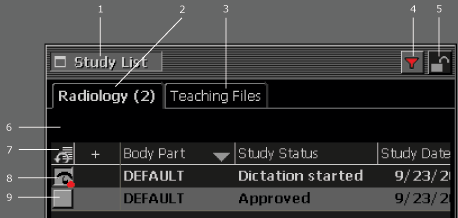
To avoid becoming a visual distraction, the Study List is grayed until you move the pointer over it. (You can also hide the Study List completely.) The main elements of the Study List are as follows:
| # | Name | Description |
|---|---|---|
| 1 | Study List bar | Expands, contracts, or resizes the Study List panel. |
| 2 | Number of available studies | Displays the number of studies for this patient available to IMPAX. |
| 3 | Teaching Files tab | Provides access to the teaching files and folders. |
| 4 | IMPAX RIS filtering | Provides a visual indication that the Study List is filtered based on IMPAX RIS criteria. Clicking the button disables filtering. |
| 5 | Synchronization lock | By default, synchronization is set to unlocked ( ) so that navigation of text and images within studies is independent. By left-clicking the lock ( ) so that navigation of text and images within studies is independent. By left-clicking the lock ( ), however, the Text area and Image area become synchronized. Single clicking a study displays both text and image information, and navigating among different studies for a patient updates the Text area with the text for that study. Synchronization can be disabled by clicking the lock icon once more, again allowing independent navigation of text and images. ), however, the Text area and Image area become synchronized. Single clicking a study displays both text and image information, and navigating among different studies for a patient updates the Text area with the text for that study. Synchronization can be disabled by clicking the lock icon once more, again allowing independent navigation of text and images. |
| 6 | Search for more studies | Appears when more than one cluster is available to search for studies. |
| 7 | Columns | Study List columns can be sorted, reordered, renamed, and added or removed. |
| 8 | Current study | The study highlighted in the Study List is the one whose information is displayed in the Text area panels. The red dot indicates that the study is being dictated or edited. |
| 9 | Open images button | Opens available study images that are not currently loaded in the Image area. When study images are loaded
or in the Cycle list of the Image area, the button changes to Images
being viewed (not bolded).  When studies are in view in the Image area, the button changes to Images
being viewed (bolded). When studies are in view in the Image area, the button changes to Images
being viewed (bolded).  |