After you make changes such as window leveling, adding markups including annotations and spine labels, or magnifying study images, you can save the changes.
 | Note: You can use the Invert, Pan, and Window Leveling tools on a softcopy presentation state, but you cannot save the actions. |
To select study changes to save
From the Image area top toolbar, click Save.

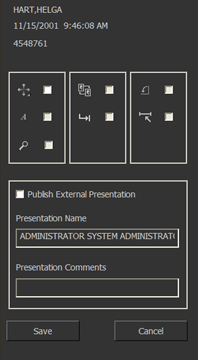 If
you have not made any study changes, the Save command is unavailable.
Otherwise,
a dialog opens listing the types of changes that can be saved. The types
of changes that have been applied to the study are selected by default
(for an example, see
image at right).
If
you have not made any study changes, the Save command is unavailable.
Otherwise,
a dialog opens listing the types of changes that can be saved. The types
of changes that have been applied to the study are selected by default
(for an example, see
image at right).To exclude a type of change from being saved, clear the appropriate checkbox.
When publishing a softcopy presentation state, clear all the checkboxes, except the Publish External Presentation checkbox, if you do not want the changes saved to the base image on the system.
When publishing a softcopy presentation state, all changes made to the study are included—the checkboxes do not apply to publishing.
To publish presentation states for the study, select Publish External Presentation.
If you have not made any changes to the image, you cannot publish the image as a softcopy presentation state.
In the Presentation Name field, type a label for the softcopy presentation state study.
The format for the default label is User Login Name User Role; for example, Peter Radiologist. You must ensure that the label is no more than 16 characters (valid characters are A-Z, 0-9, space, and underscore, and non-English characters are not supported). The label will be appended with a date stamp.
The label must be unique and if it already exists (such as, when publishing a second or third time from the same study), a versioning number is added at the end of the label text.
In the Presentation Comments field, type any appropriate comments about the softcopy presentation state.
Click Save.
The selected changes are saved.
 | Tip: To save your changes without going through a dialog first, use the Configurable Save tool. |
Changes that can be saved are as follows:
 Window
level Window
level |
 Image rearrangement Image rearrangement |
 Markup Markup |
 Tab stops Tab stops |
 Rotation and flips Rotation and flips |
 Magnification
and position Magnification
and position |
 Calibration Calibration |
| Note: Calibration, image rearrangement, and tab stop changes cannot be published. |
Required permissions
Study-based: Image Area Tools > Publish SPS Objects
Study-based: Image Area Tools > Save Geometry operation
Study-based: Image Area Tools > Save Magnification operation
Study-based: Image Area Tools > Save Markup operation
Study-based: Image Area Tools > Save Tabstops operation
Study-based: Image Area Tools > Save User Image Calibration operation
Study-based: Image Area Tools > Save Window Level operation