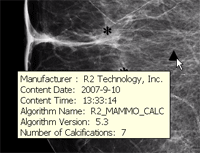
If CAD information is available for an image, you can view the following information by hovering over any CAD finding:
Manufacturer name
Algorithm
Operating point
Content date and time
Certainty of Finding for each calcification cluster and density detection (for iCAD v7.2 and higher)
The area of each density detection and calcification cluster (for iCAD v7.2 and higher)
The maximum diameter for each density detection (for iCAD v7.2 and higher)
The outline of each density detection and individual calcification (for iCAD v7.2 and higher)
The number of calcifications in each calcification cluster (for iCAD v7.2 and higher)
The nipple location (for iCAD v7.2 and higher)
 | CAUTION! CAD results assist the radiologist in the analysis of mammography images and must only be used after the completion of the initial review of the images. CAD results are not to be used to override a decision by the radiologist. |
To view CAD information
If CAD markers are not displayed, click Display Mammography CAD SR Markers.

On the image, hover over a CAD marker.
A window opens displaying the CAD information.