The Administration Tools contain the managers and monitors used to configure and maintain your system. The Administration Tools consist of two panes: the Navigation pane on the left and the Work pane on the right.
 | Note: Do not use Scavenger Manager. As of IMPAX 6.5, it is no longer supported. |
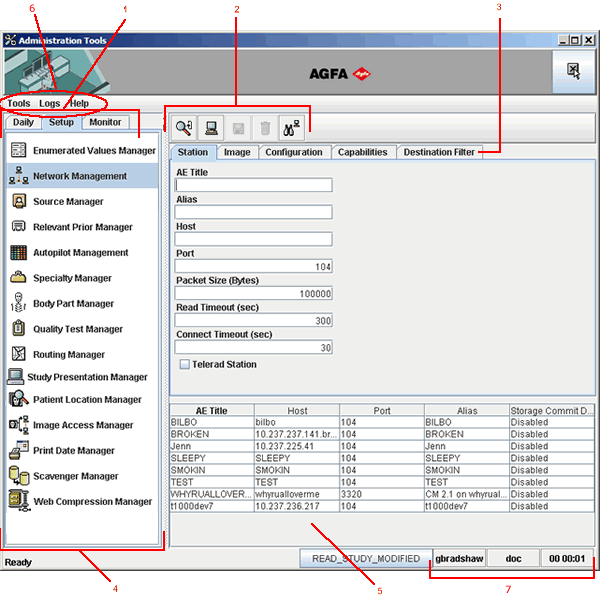
Legend:
Navigation tabs
Work toolbar
Work tabs
Navigation pane
Work pane
Menu bar
Login information
Use the Navigation pane to view the list of managers and monitors available.
Use the Navigation tabs to find your managers and monitors. Managers are listed on the Daily and Setup tabs. Monitors are located on the Monitor tab. To switch to a tab, click the tab name. To select a manager, click the manager name. The manager options appear in the Work pane.
Use the Work pane to perform your tasks. The Work pane may also contain Work tabs. To switch to a tab in the Work pane, click the tab name.
Use the Work toolbar to perform functions such as creating a record, saving a record, and refreshing on-screen data.
Other options are available in the Administration Tools menu bar.
Login information is available anytime. Listed in the bottom-right corner are:
The ID of the user who is currently logged in.
The Database Server that the Administration Tools are connected to.
The length of time that the current user has been logged in.