When authenticating with a smart card, this feature is not available.
IMPAX has a single underlying structure which specifies who “lives” where. This hierarchy paints a picture of the entire enterprise that the PACS administrator manages. The hierarchy, which is located in the Configure area navigation pane, structures the IMPAX world into roles (highlighted by the yellow square in the image below) and users (highlighted by the yellow circle in the image below). All users and roles are presented in this hierarchy, which is stored in LDAP. (Refer to Understanding LDAP and its relation to roles and users.)
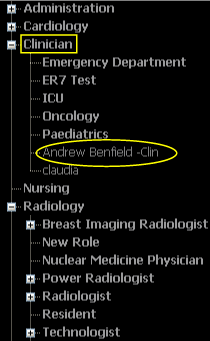
Roles
A role can be the enterprise, the institution, a department, or a team. It holds permissions and preferences as well as licensing options. Roles can contain other roles or users. For example, the Radiology role can contain sub-roles, such as:
Radiology
General Radiology
Resident
Breast Imaging
Technologist
PACS Administrators can make cross-functional roles such as an ICU Team, which might include users who are nurses, internal medicine clinicians, and radiologists. PACS Administrators model the system based on the needs of the site. However, a default set of roles is provided as a starting point.
Users
Users represent individuals, such as a radiologist or a clinician. When you create a user, he or she must belong to at least one role, a primary role. (A user can also belong to other, secondary roles.)
Users inherit their licensing and permissions from the roles they belong to. Users also inherit preferences, such as worklist options, reporting configurations, and toolbar settings, from their parent roles. When setting up IMPAX, you configure a role and all of the users in those roles inherit those settings. For details on optimizing roles for configurations, refer to Determining the hierarchy of roles and users.
You can also edit preferences for a specific user by impersonating that user. This is most useful for users such as radiologists who have specific needs.
Primary and secondary roles
Every user has one primary role—the role he or she was first placed in or created in—but can have many secondary roles. A user's preferences come from the primary role, but he or she can inherit the licensing and permissions of the secondary role to gain access to the studies available in that secondary role. Refer to Primary and secondary roles: Workflow applications.