Ability to view MR studies is optional with the Entry-Level Radiologist license.
When authenticating with a smart card, impersonation is not available.
MR studies can include two types of series descriptions:
Generated series description, generated by IMPAX
Manual series description (series_description DICOM tag), entered by the technologist performing the study
An MR hanging protocol can include both of these types of series descriptions. You can define how IMPAX creates the generated series description.
To define how IMPAX creates the generated series description
If setting preferences for other users, impersonate the user or role.
Press F12 or, from the Image area top toolbar, click Customize.

In the Customize dialog, switch to the User Profile tab.
To have IMPAX generate the series description, under Startup Defaults, select the MR: Use generated series descriptions checkbox. To use the series description as the manual series description, clear the MR: Use generated series descriptions checkbox.
To save the changes and close the Customize dialog, click OK.
Example - Rule-matching in MR hanging protocols

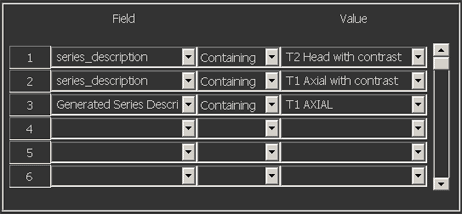
| Series number | Generated series description | Manual series_description |
|---|---|---|
| 1 | T1 Axial | T1 Axial with contrast |
| 2 | T2 Sagittal | T2 Sagittal with contrast agent |
| 3 | T2 Coronal | T2 Head with contrast enhancement |
| Position | Series number | Reason |
|---|---|---|
| 1 | 3 | Matches on rule 1 — series_description contains “T2 Head with contrast”. |
| 2 | None | Skipped. Although series 1 does contain “T1 Axial with contrast” in the series_description, it also contains T1 Axial as the generated series description. Since IMPAX checks on the generated series description first, series 1 ends up in position 3 rather than 2. |
| 3 | 1 | Matches on rule 3 — generated series description contains “T1 Axial”. |
| 4 | 2 | Placed at the end because it does not match any of the hanging protocol rules. |