You can choose whether each study image is displayed with patient demographics. Use the Demographics Toggle tool to show or hide them.
 | Tip: Some older modalities burn demographics directly onto the image. In these cases, demographics cannot be hidden. |
To show and hide patient demographics
To hide displayed demographics, from the top toolbar, click Demographics Toggle
 so
the button is unselected:
so
the button is unselected: 

CAUTION!
We do not advise turning off all patient demographics in the Image area. Configuring the Client so no patient demographics are immediately visible in the Image area introduces a risk of misidentifying a patient.
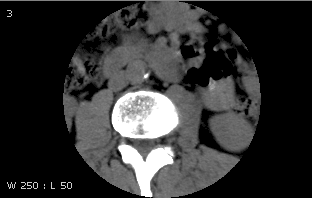
The patient demographics no longer appear on all images including any window level information. However, if you window level again while demographics remain hidden, the window leveling appears.
For breast images, the 3 cm scale on the non-chest wall side of the displayed images also no longer appears.
To show demographics, click Demographics Toggle
to select the button.
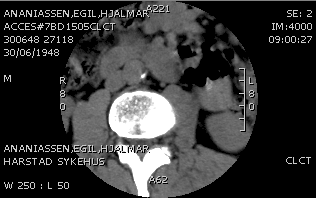
The patient demographics appear on all images. For breast images, the 3 cm scale on the non-chest wall side of the displayed images appears.
Demographics shown
Demographics hidden
 | Note: The Print demographics layout for MG commonly has fields in the upper and lower areas of the left side of the layout only. When performing a DICOM print, these fields are printed on the left side of the film for images with laterality = right. To prevent the fields from covering the auxillary region of the left breast image, the fields are flipped for images with laterality = left. |
The printed and displayed demographic layouts are not necessarily the same. What you see on-screen is dictated by the Image area display options, while what you see on the hardcopy film is dictated by the Print options. The demographic layout flip applies only to print and not to the on-screen display.