1. Pre-acquisition > 2. Acquisition > 3. Reporting > 4. Results distribution
The pre-acquisition phase begins when the physician determines that a radiological exam is required to diagnose the patient, and ends when the order has been placed with the radiology department.
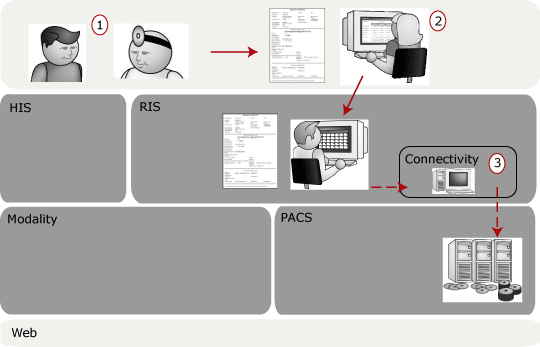
1. Patient goes to family physician
A patient goes to his family physician with a bad cough. The physician decides to refer the patient to the local hospital for a chest x-ray.
2. Receptionist calls hospital to place order
The receptionist at the physician's office places a call, or faxes or mails a requisition to the hospital's Radiology Department to reserve a time slot for the exam. The receptionist in the Radiology Department takes the order and enters it into the Radiology Information System (RIS).
3. Radiology department schedules order — study scheduled event
When the receptionist enters the order, the RIS generates a study scheduled event. (It may also generate a visit scheduled event.) The RIS then sends this event to a connectivity system. This connectivity system translates the event from HL7, which the RIS speaks, to DICOM, which the modality and the PACS speak.
The connectivity component can keep the study scheduled event for weeks until a preset time, or horizon. When the horizon arrives, such as midnight the day before the study is scheduled, the connectivity component sends the study scheduled event to the PACS. The PACS receives the event and knows to prefetch all of the relevant priors for the patient. For example, if the patient had pneumonia six months ago, the images from that old study are pulled out of long-term storage and placed in short-term storage in preparation for the radiologist to read during the reporting phase.
1. Pre-acquisition > 2. Acquisition > 3. Reporting > 4. Results distribution