1. Pre-acquisition > 2. Acquisition > 3. Reporting > 4. Results distribution
The reporting phase occurs when the imaging case is complete and the radiologist views the study images, then reports the findings.
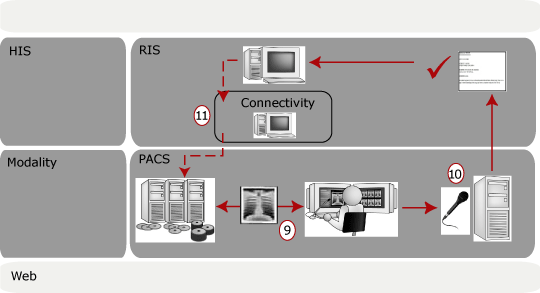
9. Radiologist searches for studies to review
At the display station, the radiologist searches for studies to review. New studies show up in his worklist. The radiologist selects one to review and report on.
10. Radiologist dictates report
The flow of the reporting step can be slightly different depending on the system used in the hospital.
Using a traditional voice dictation system, the radiology records his dictation on tape. The recorded dictation is listened to and transcribed by a transcriptionist. The report is then sent back to the radiologist for approval. The report, along with the report status is sent to the Radiology Information System (RIS).
or
Using a voice recognition system, the radiologist dictates, edits, and approves the report. The voice recognition system sends the report, along with the report status, to the Radiology Information System (RIS).
11. RIS sends interpretation transcribed, updated, and approved events
As the RIS receives the report from the dictation system or the voice recognition system, the RIS sends interpretation transcribed, updated, and approved events to the connectivity component. These events are sent to the PACS to update the study status. The report itself is stored on the RIS, not the PACS.
1. Pre-acquisition > 2. Acquisition > 3. Reporting > 4. Results distribution