Reference lines show where a selected image intersects any orthogonal series that are on the screen. They display the physical location of one or more linked images on orthogonal images, allowing a radiologist to navigate to the appropriate anatomy and become oriented in 3D.
When viewing multiple series, the reference lines for the selected series, and any linked series, are displayed on the orthogonal series. The active series is identified with a solid line. Various dashed lines are used to identify the series that are linked to the active series. To identify which dashed line corresponds to which series, select another series, and observe which reference line becomes the solid reference line.
The reference line for the active series also contains a square handle that can be moved back and forth along the reference line. This adjusts the linking point for the other linked series in relation to the active series. The handle is only shown if more than one series are linked.
When are reference lines displayed?
When Reference Lines are enabled in the Linking Preferences context menu, reference lines are displayed in the following circumstances:
When the active series intersects with orthogonal series.
When linked series intersect with the active series (reference lines are displayed on orthogonal series).
In tile mode, on every image in the orthogonal series when more than one image in a series is displayed.
For any supported (with more than one series displayed) screen layout.
In Active Target mode for only the active series.
When Reference Lines are enabled in the Linking Preferences context menu, reference lines are not displayed in the following circumstances:
On a series more than 45 degrees off axis.
Within the active series itself.
When the visible image for a linked series does not intersect with the active series.
When there is no corresponding location (from active series to orthogonal).
When editing which series are linked.
When series is not linked to the active series.
When the linked series does not correspond to the body part of the active series.
When the images in the linked series are beyond the first and last images in the active series.
When rearranging series in the Available Series palette.
When the frame of reference is different between the active series and the orthogonal series.
When in Active Target mode and the series is the active series.
When displaying the active target.
When using Navigate All.
When using the Cine tool.
When the Reference Lines preference is disabled in the Linking Preferences context menu, Reference Lines are only displayed in the following circumstances:
While in Active Target mode, but not while Active Target cross hairs are displayed.
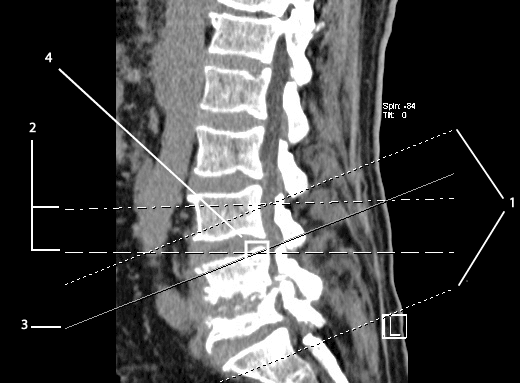
| # | Name | Description |
| 1 | First and last slice | The first and last slice of the active series. |
| 2 | Linked series | Reference lines for co-planar series linked to the active series. |
| 3 | Active series | The series to which all linked series are linked. |
| 4 | Intersection point | A square handle that can be moved back and forth along the reference line. This adjusts the linking point for the other linked series in relation to the active series. |