You can route access to images in one of three ways:
Directly to an image storage point using aspftp
Through a load balancer in front of multiple storage points
Through the pixel data service on the Application Server or through a load balancer in front of multiple Application Servers
Consider the following when configuring how images will be accessed.
| Directly to image cache | Load balancer to image cache | Pixel data service on Application Server | |
|---|---|---|---|
| Application Server | Bypasses the Application Server. | Bypasses the Application Server. | Direct connection or connection through a load balancer. |
| Protocol | aspftp | aspftp | http https |
| Port | aspftp = 3040 | aspftp = 3040 | http=80 https=443 |
| Security | Authenticates users but does not encrypt data. Recommended for use inside the firewall. | Authenticates users but does not encrypt data. Recommended for use inside the firewall. | Highest security is https, which authenticates users and encrypts data. |
| Performance | Faster performance for original and web images. | Faster performance for original and web images. | Achieves about half the speed of an aspftp connection. |
| Configuration | Each image cache is listed as a storage point in the Configure area - Stations section. Only one storage point can be included in each storage group. Define the URL used to access images in each storage group. | Each image cache is listed as a storage point in the Configure area - Stations section. Group multiple storage points into one storage group. Clients then access all images in this storage group through a single URL to the load balancer. You must also configure the load balancer to access all storage points in the storage group. | Image storage groups are not required. All access is done directly through the pixel data service on the Application Server. The protocol and application server used is configured in the Business Services tab. No special image access configurations are required. |
| Web cache | All requests to the web cache are funneled through a single storage point, typically the master Curator. | All requests to the web cache are funneled through the load balancer. The load balancer can then be configured to point at one or multiple Curators. (If you have multiple Curators, only the cache on the master Curator is listed as a storage point in the Configure area - Stations section.) | All requests to the web cache are funneled by the pixel data server to the master Curator. |
Directly to image cache
| URL used to access the image cache | |
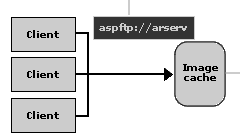 |
Only one image storage point in each storage group |
Load balancer to image cache
| URL used to access the caches in the storage group | |
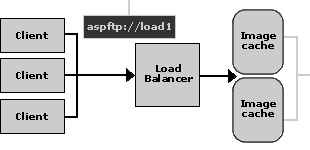 |
Image storage points in one storage group |
Pixel data service on Application Server
| URL defined in the Services Access settings | |
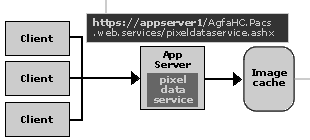 |
The Application Server's pixel data service determines where it retrieves images |