Uncropped MG (mammography) breast images are automatically right-aligned or left-aligned, according to patient orientation. Images from patients with posterior orientation are right-aligned. Images from patients with anterior orientation are left-aligned. This applies to all screen formats.
The orientation of the Mammography View selected for display is determined by the Left and Right Breast Comparison and Same View settings in the Comparative Review tab of the Customize dialog. This setting determines if the right breast or the left breast is presented on the left side and whether or not compare views are chest wall aligned or presented with the nipples pointing in the same direction.
Example
| Right craniocaudal image = right-aligned | 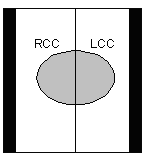 |
Left craniocaudal image = left-aligned |
As well, the black band that separates the images is minimized to allow for better comparisons. If required, you can use the Pan tool to adjust the vertical alignment of the images.