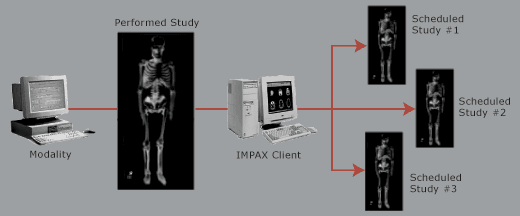
Segmenting a study means breaking or copying a single study into multiple studies for one patient. This involves selecting the images to be associated with each order/study, and in some cases may require duplicating images (such as overlapping procedures based on physiology). This could be required, for example, if three studies were ordered but only one study was performed at the modality.
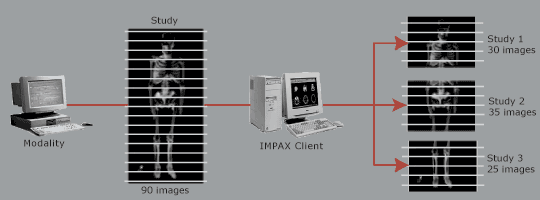
 | Note: The number of images do not necessarily add up to the number in the original study (such as 90 in this example). There may be more or less depending on whether images were not selected or overlap (assigned to multiple studies and cloned). |
Cloning is a specialized form of segmenting that assigns an image of the performed study to more than one scheduled study. For example, if three studies were scheduled and one was performed, you could copy images from the performed study to all of the scheduled studies.
How studies are segmented
The following occurs as studies are segmented:
If the study UID of the original study to be segmented matches one of the orders and some images in the study are not selected for segmentation, you are warned that the unselected images will be deleted.
If the study UID of the original study does not match any of the orders, new studies are created and associated with the orders, and the original study is unchanged. For example, an order is placed for patient A for a CT Thorax and a CT Abdomen/Pelvis; however, the technologist scans all the images under the order CT Thorax. If the technologist does not include the CT thorax while doing the segment, the original study stays unchanged (with Chest/Abdomen/Pelvis) and the CT Abdomen/Pelvis is copied to the new study.