In IMPAX Reporting, when a reporting session is started by creating a new report or by editing an existing report, the Report panel of the Text area looks similar to the following:
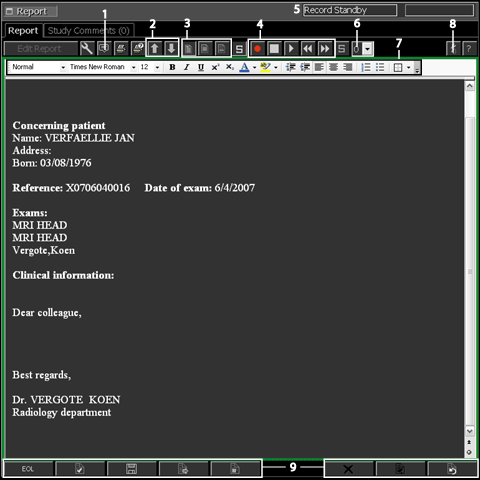
The following table describes the numbered elements of the Text area report panel
| Number | Name | Description |
|---|---|---|
| 1 | Report remarks | Displays the report remarks, which are user notes linked to the report. |
| 2 | Zoom buttons | Zoom in and out of a report to increase or decrease the size of the font. |
| 3 | View report buttons |
|
| 4 | SpeechMike controls | Provides the same functions as the buttons on the SpeechMike, which are:
|
| 5 | Status indicator | Displays the current speech application state, which can be any of the following:
|
| 6 | Dictation priority | Defines the report transcription/correction priority when submitting the report for transcription/correction. Priorities range from 0 (lowest) to 5 (highest). The dictation priority can also be set in the Reporting options dialog. |
| 7 | Embedded MS Word* | Contains the report template and Microsoft Word toolbars. A green square outlines the embedded Microsoft Word area when the application is in edit mode and a red square outlines the Microsoft Word area when the application is in recording mode. |
| 8 | Audio level indicator | Displays the recorded audio strength during recording and playback. |
| 9 | Workflow controls | The workflow controls at the bottom of the report panel are used to finish a reporting session. |
 —
— —
— —
— —Record
 —Stop
—Stop —Play
—Play —Fast rewind
 —Fast forward
*Only available when online speech recognition is used.