The following diagram illustrates the general flow of images between the image cache and web cache:
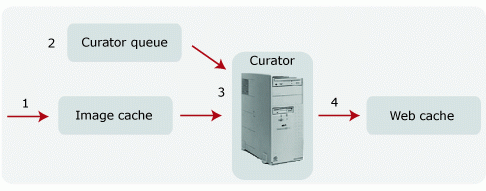
As studies arrive from the SCP or are retrieved from the archive, each study object is stored in the image cache and a STUDY_ARRIVED notification is created.
Task Scheduler receives the notification, creates a PREPARE job for the study, and places the job in the Curator job queue.
The next Curator to check the Curator job queue takes ownership of the PREPARE job and reads the study objects from the image cache.
Curator compresses the appropriate objects using the Mitra wavelet format and stores them in the web cache.
For each object in the study, Curator considers the following:
If the object is already in the web cache, it is not processed again.
If Mitra wavelet compression is required, the object is processed, compressed, and stored to the web cache. Curator generates a new DICOM header for each image.
If Mitra wavelet compression is not required, the object is copied to the web cache. This prevents image access privilege problems and reduces partial study problems arising from studies being spread across multiple AE_REFs.
After the study is processed, Curator sends an MVF notification and, if configured, an EPR notification to indicate that new wavelet images are available.