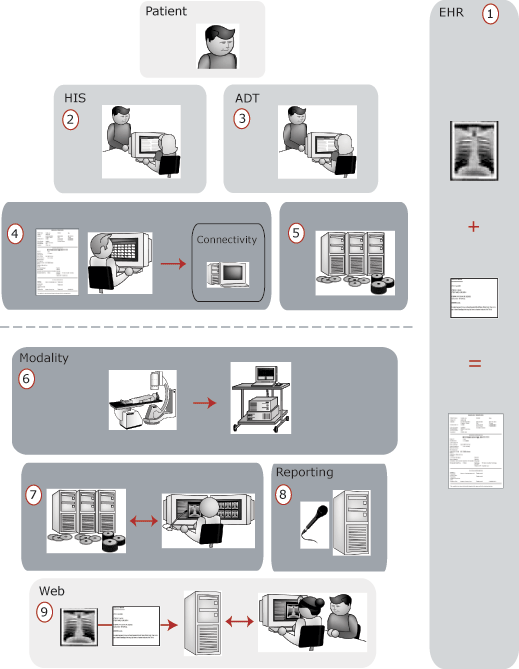
Understanding the components of a digital radiology department helps you visualize the way each of the components interact, and how the different people, machines, and components work together to help you provide quality healthcare. This diagram demonstrates how information and images flow through the different areas of a hospital. Each hospital may have different tools and programs to perform these functions, but the way the components interact is essentially the same.
In the diagram, the components above the dashed gray line deal with the demographic information and orders for a patient. The components below the dashed gray line deal with the images and reports that are associated with a patient. The Electronic Health Record (EHR) spans the entire length of the diagram to show that throughout a patient's visit to the hospital, the EHR is continuously being updated with new information.
Information gathered in the hospital workflow flows in both directions. For example, information gathered by the modality is passed to the Picture Archive and Communication System (PACS), as well as to the RIS. More on the flow of information and messaging is provided in Scheduled study workflow: The system's view.
1. Electronic Health Record (EHR)
The Electronic Health Record (EHR) is a record of all medical data about a patient, in electronic form. The data in the EHR is composed of images and reports gathered during a patient's treatment. It also includes up-to-date results, clinical information, and reminders that prevent the unnecessary duplication of radiological and laboratory exams. In some enterprises, family doctors can access this information.
The goal of the EHR is to integrate all of this patient information into one system, but often the health records can be found in many different systems in the hospital, such as the Hospital Information System (HIS), Radiology Information System (RIS), Laboratory Information System (LIS), and so on.
2. Hospital Information System (HIS)
A Hospital Information System (HIS) may be comprised of an EHR component, a patient registration component and an order/scheduling component. The HIS is responsible for ordering patient examinations among all healthcare organization departments. They typically send an order to a departmental information system that contains high-level diagnostic requests. The details of these requests are completed and sometimes changed by the departmental information system. HIS systems are typically interested in the status of orders that were placed along with the final results of an order (reports).
3. Admission, Discharge, and Transfer (ADT)
Admission, Discharge, and Transfer (ADT) systems are responsible for Patient Administration. ADT systems are generally built into or are a part of the HIS. ADT information systems are responsible for maintaining the following data:
Patient demographics (patient identifier, name, sex, date of birth, weight, height, and so on)
Patient visits to the healthcare organization
Admissions, discharges, or transfers of the patient
Patient location
4. Radiology Information System (RIS)
The radiology department uses the Radiology Information System (RIS) to:
Manage patient visits to radiology.
Schedule and track diagnostic procedures.
Store diagnosis and results.
Send billable items to billing systems.
The RIS conveys scheduled procedures to modalities via a worklist. This worklist allows the technologist to simply select a patient and procedure at the modality. After the procedure is completed, all of the patient demographics are automatically included with the resulting images.
5. Auditing
To conform with privacy and security standards, auditing provides the ability to recreate the actions of a particular user or users, whether those users are people, external systems such as modality sources, or external systems such as a HIS, RIS, PACS, or web viewer. The following events trigger an addition to the audit log:
A user views the specific details, images, or reports of a patient.
A user initiates a search that results in the display of Protected Health Information (PHI).
A user views, adds, deletes, merges, prints, or modifies PHI.
This audit information is saved and can be viewed to determine who has viewed a patient's PHI, or to provide the audit information to the patient upon request.
6. Modality
Modalities are responsible for acquiring various types of images that are later reviewed by radiologists for diagnostic purposes. Most modern acquisition modalities are digital. They query departmental information systems for scheduled procedures to be completed. Captured images are sent digitally to PACs systems. Types of modalities include X-Ray, Computed Tomography (CT), Ultrasound, and MRI Scanners.
7. Picture Archive and Communication System (PACS)
The PACS stores, transmits, displays, and prints medical images. Radiologists, cardiologists, and clinicians use the PACS Display Station to view and report studies. The PACS Server manages and shares information related to study attributes, system configuration, user accounts, study markup, and annotation of studies. It collects, organizes, and manages all patient and study demographic data.
8. Reporting
The radiologist reviews a study and creates the report that accompanies the study. The report can be generated in a variety of ways:
Handwritten
Dictated onto tape
Dictated into voice recognition software
Reports are then converted into a document, either by a transcriptionist or by voice recognition software. Voice recognition software displays the spoken words on a computer screen that the radiologist can see during dictation. Reports are typically stored long-term in the RIS.
9. Web
Images and reports are also available through a Web-based interface. Physicians can view studies and reports from any location on standard web browsers such as Netscape Navigator or Microsoft Internet Explorer. This is intended for use in clinical review and referral of medical images and not for official diagnosis.
An additional web component may be attached to the HIS that allows physicians to view electronic patient records, and any images that may be associated with that patient.