Using IMPAX RIS, you have a choice of three reporting workflows. For in-depth information on all workflows related to IMPAX RIS, consult the Reporting Workflows for IMPAX Reporting Guide.
Basic reporting
Resident/supervisor
Co-reporting
Basic
This workflow involves one radiologist who creates, reviews, and signs off the report.
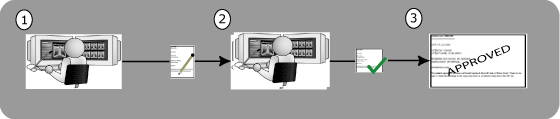
The radiologist creates a new report.
The radiologist reviews and signs off the report.
The report is now validated.
Resident/supervisor
This workflow involves a resident who creates and reviews the report and a radiologist who reviews and signs off the report.
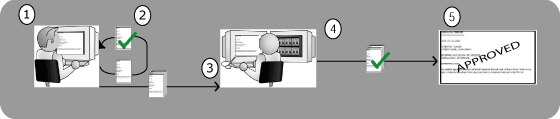
The resident creates the report.
The resident reviews the report and optionally can sign off the report.
The report is listed in the radiologist's sign-off worklist.
The radiologist reviews and signs off the report.
The report is now validated.
Co-reporting
This workflow involves two radiologists who both need to review and sign off on the report.
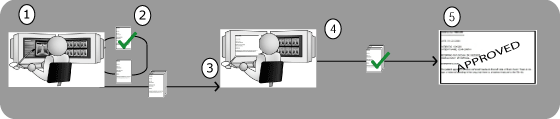
Radiologist A creates the report.
Radiologist A reviews and signs off the report.
The report is partially validated.
The report is listed in radiologist B's sign-off worklist.
Radiologist B reviews and signs off the report.
The report is fully validated.