Using IMPAX Reporting, you have a choice of three speech workflows:
Digital dictation
Speech recognition dictation: offline
Speech recognition dictation: online
Digital dictation
This workflow makes use of a recording device that the radiologist uses to dictate report findings. A voice file is created and sent to a transcriptionist to convert to text.
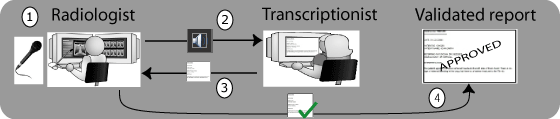
The radiologist dictates a voice file for the report findings.
The radiologist submits the voice file for transcription.
The transcriptionist types out the report.
The radiologist reviews the report and validates it.
Speech recognition: Offline
This workflow makes use of a speech server to record the speech file. In the offline mode, the file is sent to the speech server where it is converted to text for the report.
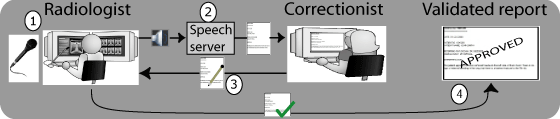
The radiologist dictates findings as a speech file and the file is sent to the speech server.
The speech server converts the dictation into text for the report.
The correctionist types out the report and makes any necessary corrections.
The radiologist reviews the report and validates it.
Speech recognition: Online
In this workflow, the speech file is immediately converted to text on the IMPAX Client.
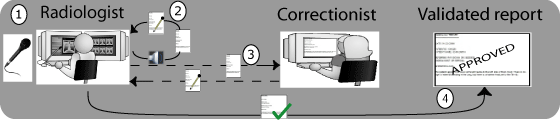
The radiologist dictates findings which are converted immediately into a report by the speech engine.
The radiologist corrects and reviews the report.
Optionally, the radiologist can submit the report to the correctionist for further correction.
The radiologist validates the report.