Agfa has a keypad designed specifically for mammography that makes it easier to navigate through, magnify, and change comparative review modes for breast images.
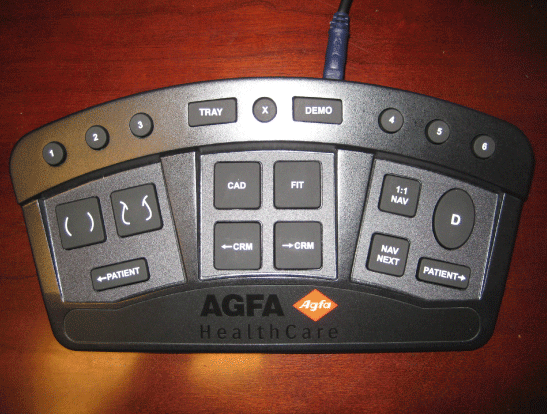
| Agfa mammography keypad | Standard keyboard shortcut | Description |
|---|---|---|
| 1 | Alt+Ctrl+1 | Displays all markup or hides all markups. |
| 2 | Alt+Ctrl+2 | Place a markup arrow to point to areas of interest. |
| 3 | Alt+Ctrl+3 | Measures an elliptical region. |
| Tray | Alt+Ctrl+4 | Shows or hides the Available Series palette |
| X | Alt+Ctrl+5 | Shows or hides the Available Series palette and patient demographics. |
| Demo | Alt+Ctrl+6 | Shows or hides patient demographics. |
| 4 | Alt+Ctrl+7 | Exchanges the white and black areas of an image. |
| 5 | Alt+Ctrl+8 | Exchanges the white and black area for a study. |
| 6 | Alt+Ctrl+9 | Links studies that navigation performed on one series applies to all series. |
 | Ctrl+Shift+1 | Applies the Current CC comparative review mode. |
 | Ctrl+Shift+2 | Applies the Current MLO comparative review mode. |
 | Ctrl+Shift+3 | Navigates to the previous patient. |
| CAD | Ctrl+Shift+4 | Shows or hides CAD SR overlay markers. |
| FIT | Ctrl+Shift+5 | Scales images so that the breast fills the available viewport space. |
 | Ctrl+Shift+6 | Moves back to the previous comparative review mode defined for mammography studies. |
 | Ctrl+Shift+7 | Moves forward to the next comparative review mode defined for mammography studies. |
| 1:1 Nav | Ctrl+Shift+8 | Displays the breast image at a one-to-one pixel size (each pixel on the screen represents one pixel in the modality image). |
| D | Ctrl+1 | Starts dictation for a single study. |
| Nav Next | Ctrl+Shift+9 | Navigates to the next quadrant of the breast image. |
 | Ctrl+2 | Navigates to the next patient. |