Some configurations of IMPAX have the IMPAX RIS server positioned remotely to the Application Server over a WAN. In this situation, high latency (30 MS or greater) may occur and performance within the IMPAX Text area may not be as expected.

In the previous example, the database traffic travels over the WAN communicating directly from the Application Server to the RIS database. In combination with network latency of the WAN, the Text area is directly affected, slowing its response time.
You can improve these response times by placing a second Application Server next to the RIS server. The two Application Servers pass non-database network to each other, removing a large percentage of database traffic from the latent WAN.
The Application Server positioned next to the RIS server must be configured as a single-host AS300 solution so it can viewed as a second IMPAX cluster, though not function as one. Its purpose is to relay messages from the main Application Server to the RIS server.
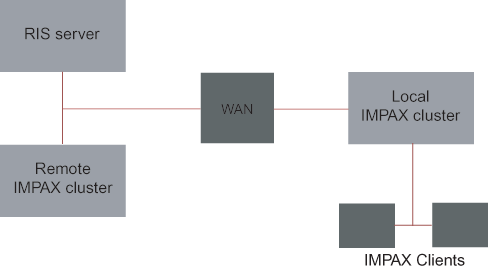
In the previous example, the local IMPAX cluster is situated at the main site where modalities send studies to it and the IMPAX Clients connect directly to it. The remote IMPAX cluster is situated remotely from the site but near the RIS server and no studies are sent to this cluster or IMPAX Clients do not connect to it.