Issue
Warnings are appearing in the System, Application, and Security logs of the Windows Event Viewer.
Details
The following warnings appear in the Windows Event Viewer logs:
System log
The application-specific permission settings do not grant Local Activation permission for the COM Server application with CLSID {BA126AD1-2166-11D1-B1D0- 00805FC1270E} to the user BERTHA\ImpaxServerUser SID (S-1-5-21-1608871274- 1662235239-3903305416-1008). This security permission can be modified using the Component Services administrative tool.
Application log
The configuration information of the performance library C:\WINDOWS\system32\perfts.dll for the TermService service does not match the trusted performance library information stored in the registry. The functions in this library will not be treated as trusted.
Security log
Audit failures are appearing, similar to the following:
Object Open:
Object Server: SC Manager
Object Type: SERVICE OBJECT
Object Name: RemoteAccess
Handle ID: -
Operation ID: {0,13392958}
Process ID: 648
Image File Name: C:\WINDOWS\system32\services.exe
Primary User Name: BERTHA$
Primary Domain: WORKGROUP
Primary Logon ID: (0x0,0x3E7)
Client User Name: ImpaxServerUser
Client Domain: BERTHA
Client Logon ID: (0x0,0xBE71)
Accesses: Query status of service
Privileges: -
Restricted Sid Count: 0
Access Mask: 0x4
Solution
To remove warnings from the logs of the Windows Event Viewer
On the Application Server, select Start > Administrative Tools > Component Services.
Expand Component Services > Computers > My Computer > DCOM Config.
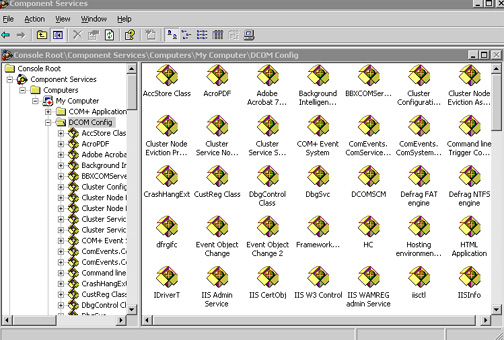
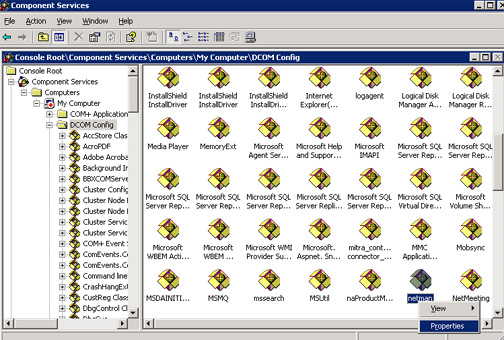
From the right pane of the Component Services window, right-click netman and select Properties.
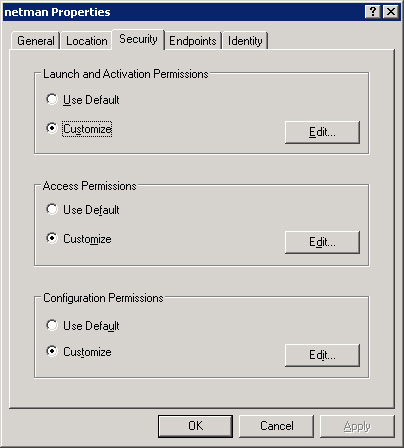
In the netman Properties dialog, switch to the Security tab.
Under Launch and Activation Permissions, select Customize and click Edit.
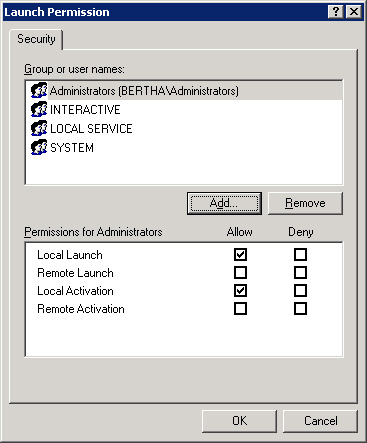
In the Launch Permission dialog, click Add.
In the Enter the object names to select field, type ImpaxServerUser.
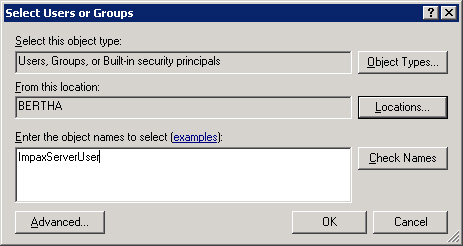
Click OK.
In the Group or user names list, select ImpaxServerUser.
Under Permissions for ImpaxServerUser, select the Allow Local Launch and Allow Local Activation checkboxes.
Repeat steps 6 to 10 for the Network Service user.
Click OK.
To save the changes to netman properties, click OK.
Close the Component Services window.